Blog Post
Meet the New Fluently Practice Modes
Torben Ziegler
March 25, 2026
A closer look at the five new practice modes in the relaunched Fluently app, and how each one helps learners review with more focus, variety, and momentum.
Some study days call for structure. Others call for speed, variety, or a confidence boost.
That is exactly why the relaunched version of Fluently introduces a much more flexible practice experience.
Instead of pushing every learner through the same kind of review session, Fluently now lets you choose how you want to practice in the moment. Whether you want to clean up weak spots, revisit saved priority words, or just get a quick mixed session in before your day starts, there is now a dedicated mode for it.
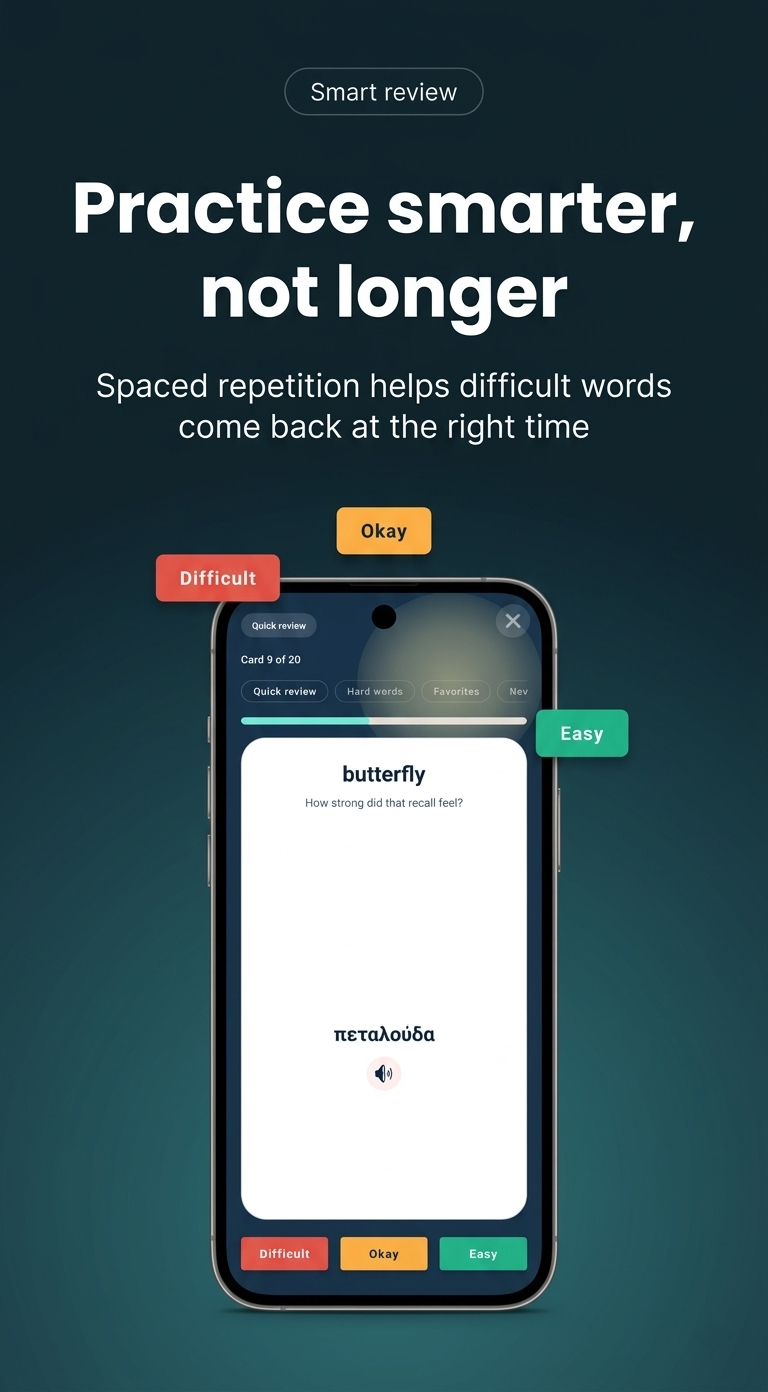
Practice should feel like it fits your energy, not fight against it.
Why We Expanded Practice
Practice is the heart of Fluently.
In the earlier experience, review worked, but it was more one-dimensional. You could practice your lists, but the app did not give you many ways to shape a session around what you actually needed right then.
The relaunch changes that.
The new system keeps the same simple reveal-and-rate flow, but adds multiple ways to filter and focus your session:
Quick reviewfor your normal smart review flowHard wordswhen you want to target weak spotsFavoriteswhen you want to drill your most important saved wordsNew wordswhen you want to lock in fresh additionsMixed challengewhen you want variety from across the list
That means practice can now feel more intentional, more motivating, and much more adaptable from day to day.
One Core Flow, Five Different Study Styles
All five modes still use the same familiar Fluently rhythm:
- See the native word.
- Reveal the foreign word.
- Rate how well you remembered it with
Again,Almost, orNailed it.
That consistency matters. The learning interaction stays simple, but the session itself becomes much smarter depending on what you choose.
Quick review for your default daily rhythm
Quick review is the standard Fluently experience and the best place to start if you just want the app to guide you.
It is designed for the learner who wants to open a list, begin immediately, and trust the app to serve a solid review session without extra setup.
This is the mode for:
- regular daily practice
- keeping momentum with minimal friction
- picking up where you left off
Hard words for concentrated catch-up sessions
Some days, the best thing you can do is stop avoiding the words that keep tripping you up.
Hard words brings your weakest vocabulary to the front, making it easier to spend time where it matters most. It is a shorter, more focused mode built for problem-solving rather than broad review.
This is the mode for:
- fixing weak areas
- rebuilding confidence on difficult vocabulary
- getting a high-signal session when time is limited
Favorites for your personal priority vocabulary
Not every word matters equally.
Sometimes you have a set of terms you really care about: travel essentials, exam vocabulary, work phrases, or words you simply want available on demand. Favorites turns that saved shortlist into its own practice lane.
This is the mode for:
- exam prep
- travel phrases
- interview or workplace vocabulary
- any words you want fast access to again and again
It is a small change on paper, but it makes Fluently feel much more personal in use.
New words for early familiarization
Fresh vocabulary needs a different kind of attention.
When you have just added new words to a list, jumping straight into a broad review can feel noisy. New words helps with that by focusing on vocabulary that is brand new or barely practiced, so your first repetitions feel lighter and more deliberate.
This is the mode for:
- recently added vocabulary
- the first few review passes on a new list
- learners who want a softer entry into practice
It is especially useful when you are building momentum after creating a new collection.
Mixed challenge for variety and surprise
Sometimes the best session is the one that feels a little less predictable.
Mixed challenge pulls a shuffled sample from across your list, giving you a broader and more varied session. It is not as targeted as Hard words or New words, but that is the point. It adds energy and range.
This is the mode for:
- broad coverage
- breaking out of repetitive review patterns
- quick sessions that feel a bit more dynamic
Built to Stay Smooth, Even When a List Is Sparse
One subtle but important part of the redesign is that practice avoids dead ends.
If a mode does not have enough matching words, Fluently safely falls back to Quick review instead of leaving you with an empty session. That keeps practice dependable, especially when you are working with smaller or newer lists.
The result is a system that feels flexible without feeling fragile.
More Than a Filter Bar
These new modes are part of a broader redesign of the practice experience itself.
The relaunched practice screen also introduces:
- a more polished visual layout
- clearer prompt and reveal pacing
- a visible progress label and progress bar
- improved answer buttons
- easier mode switching inside the session
Together, those changes make practice feel less like a utility screen and more like a focused learning moment.
Practice That Matches Real Life
This is the bigger idea behind the new modes: language learning is not the same every day.
Some days you want to review normally. Some days you want to attack weak words. Some days you only have enough energy for a short, varied session. And some days you want to revisit the words that matter most to you personally.
The relaunched Fluently now supports all of those moments much better.
That is what these new practice modes are really about. Not just more options, but better-fitting options.
If you have already tried the relaunch, start with Quick review, then experiment with Hard words, Favorites, New words, and Mixed challenge to find the rhythm that works best for the way you learn.